
Transform Yourwith AI-Driven Precision
Streamline inbox management, scheduling, and communication — reducing administrative effort by up to 45%.
Trusted by leading organizations
The Administrative
Challenge
Organizations across industries face mounting pressure from administrative bottlenecks that slow operations, frustrate customers, and drain valuable resources.
Heavy Administrative Workloads
Overwhelming email volumes cause significant response delays, frustrating customers and staff alike.
Response Time Bottlenecks
Lack of personalized, real-time support leads to extended waiting periods and decreased satisfaction.
Resource Constraints
Limited guidance resources at international student centers and customer success teams.
Complex Processes
Multiple forms, complex procedures, and tight deadlines create constant operational stress.
High Volume Challenges
Customer success teams struggle with inquiry volumes and compliance tracking requirements.
Financial Consequences
Missed deadlines result in major financial penalties and legal compliance issues.
The Cost of Inefficiency
Organizations lose valuable time and resources due to manual administrative processes
Time Lost to Manual Tasks
Average Response Time
Annual Cost of Delays
The Complete AI
Ecosystem
Experience seamless integration, intelligent automation, and unparalleled efficiency across your entire organization.
Universal System Integration
Seamless Enterprise Connectivity
Traack AI integrates natively with your existing technology stack, eliminating compatibility concerns and ensuring smooth data flow across all enterprise systems.






Intelligent AI Assistant
Conversational Enterprise Intelligence
Engage with our advanced AI assistant that understands context, provides intelligent responses, and helps you navigate complex organizational challenges through natural conversation.
Understands and responds to complex queries
Provides instant solutions to operational challenges
Maintains conversation context and institutional knowledge
Smart Inbox Management
AI-Powered Email Optimization
Transform your email workflow with intelligent categorization, automated prioritization, and AI-generated response suggestions that learn from your communication patterns.
Smart Categorization
Automatically organizes emails by priority and category
Response Generation
AI-crafted replies with tone matching and context awareness
Regeneration Options
Multiple response variations with editing capabilities
Platform Integration
Seamless operation across Gmail and Outlook ecosystems
Smart Public Chat Interface
24/7 Automated Engagement
Deploy intelligent chat widgets that provide instant, accurate information to stakeholders, reducing administrative burden while enhancing user experience and engagement.
Instant Information Access
Seamless User Onboarding
Enterprise Scalability
67% Efficiency Gain Across Departments
Organizations using Traack AI report significant improvements in operational efficiency, response times, and stakeholder satisfaction within the first quarter.
Response time reduction across all communication channels
Time spent on administrative email management tasks
Automated stakeholder support with intelligent chat
Next-Gen Mobile App
for Modern Customers
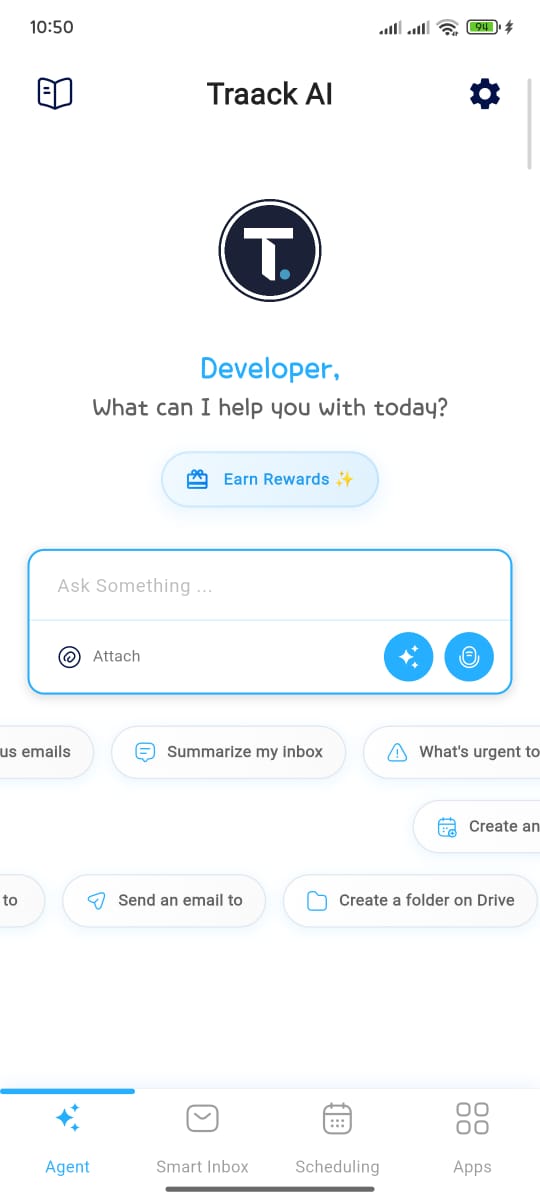
Experience the future of interaction with our AI-powered mobile platform. Seamlessly manage your communications with unprecedented ease and intelligence.
Everything You Need in Your Pocket
Our revolutionary mobile app transforms how our users interact among themselves. It offers AI-powered assistance, real-time updates, and seamless communication tools.
Instant AI Support
Get intelligent answers to your questions 24/7 with advanced AI-powered chat assistance
Smart Scheduling
Never miss important deadlines with intelligent calendar integration and proactive reminders
Real-time Notifications
Stay updated with personalized alerts, status updates, and important institutional announcements
Enterprise Security
Your data is protected with military-grade encryption and enterprise-level security protocols
Ready to Transform Your
Mobile Experience?
Join thousands of users already signed up for early access to our revolutionary mobile platform.
Who We Serve
Traack AI empowers organizations across industries to streamline their administrative processes and deliver exceptional customer experiences with AI-driven automation.
Colleges & Universities
Admissions, international student offices, alumni relations, and student success teams streamline operations and engagement.
Small Businesses
Customer success teams and service firms enhance client experience with AI-powered workflows.
Foundations & Nonprofits
Empower donor relations, scholarship management, and volunteer programs with automation.
HR Departments
Centralize employee case management and improve compliance and documentation with ease.
Law Firms
Simplify client interactions and accelerate case reviews through intelligent automation.
Regular Users (Mobile App)
Individuals managing daily tasks, personal organization, and productivity with AI assistance on-the-go.
Common Use Cases
Discover how different teams are leveraging Traack AI to simplify operations, elevate customer experience, and automate what matters.
Student Services
Automate admission queries, visa support, and academic advising to boost student engagement.
- 24/7 Query Response
- Visa Documentation
- Academic Planning
Customer Success
Enhance client relationships with intelligent automation for onboarding, renewals, and retention.
- Automated Onboarding
- Renewal Reminders
- Retention Analytics
Legal Support
Centralize case management, client communications, and compliance workflows effortlessly.
- Case Management
- Client Updates
- Compliance Tracking
HR Operations
Streamline HR queries, policy guidance, and documentation with conversational automation.
- Employee Self-Service
- Policy Assistant
- Document Management
Personal Productivity
Manage daily tasks, reminders, and personal organization with AI assistance on your mobile device.
- Task Automation
- Smart Reminders
- Personal Assistant
Customers Love Us!
See how organizations across industries are transforming their operations and delivering exceptional results with Traack AI.
"Traack AI is a game-changer for our firm. We're now able to manage higher caseloads, cut down on paperwork, and our clients are happier with faster results."
"This tool has transformed how we manage our global workforce's visa compliance. HR is now more efficient, and we've had fewer compliance issues."
"As an advisor, I struggled with the volume of student inquiries. Traack AI simplified everything and provided the support our students needed."
Proven Results Across Industries
Our customers consistently achieve remarkable improvements in efficiency and satisfaction
Faster Response Times
ROI Achievement
Customer Satisfaction
Setup Time
Streamline Your Email Workflow with AI

Smart Email Organization
Automatically categorize and prioritize messages for efficient workflows.
AI-Powered Responses
Generate accurate, context-aware replies in seconds.
Automated Scheduling
AI that analyzes emails and books meetings instantly.
Seamless Integration with Your Favorite Tools
Traack AI works effortlessly with both Google and Outlook to unify your workflow.
Join thousands of professionals transforming their email management with AI-powered automation.
Referral Rewards Program
Refer another organization and both of you get 7–14 extra free trial days.